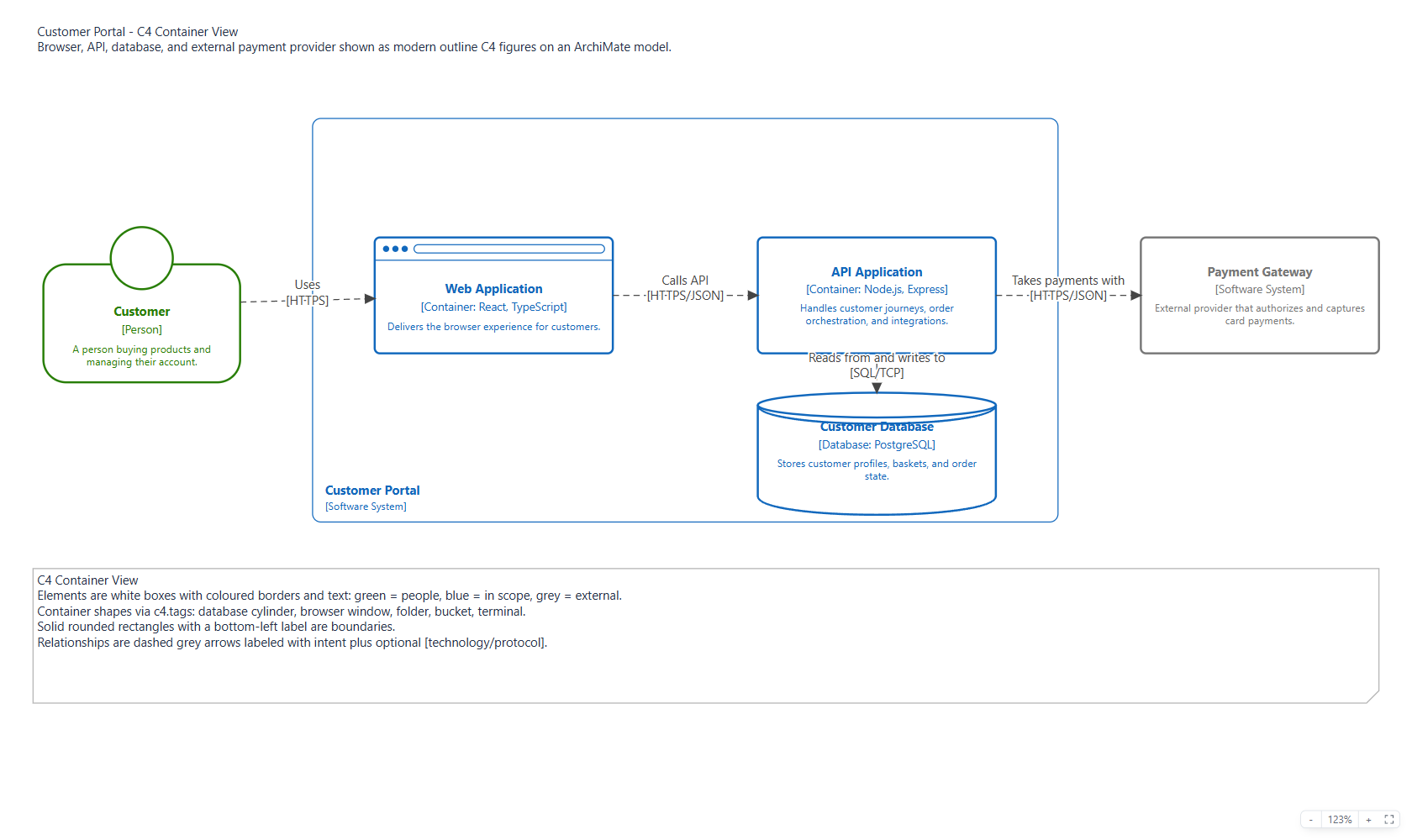
C4 Modeling
Archi Online supports C4 as a built-in ArchiMate profile. It does not add a second metamodel: C4 concepts are stored as normal ArchiMate elements, relationships, views, and properties, so .archimate, Open Exchange, and CSV flows remain compatible with Archi and other ArchiMate tooling.
The implementation follows the C4 idea that the notation is tool independent, then uses ArchiMate for durable semantics. The practical rule is: model the C4 view first, and switch to richer ArchiMate modeling only when the distinction is architecturally useful.
Creating C4 views
Use C4 in the toolbar or right-click the Views folder in the model tree and choose New C4 View. The built-in templates cover:
- System Landscape
- System Context
- Container
- Component
- Deployment
- Dynamic
When a C4 view is active, the palette shows C4 shortcuts for Person, Software System, Container, Component, Deployment Node, Infrastructure Node, Database, Web Browser, Folder, Bucket, and Terminal. Database, Web Browser, Folder, Bucket, and Terminal are all C4 Containers backed by ApplicationComponent; their shortcuts add the corresponding database, browser, folder, bucket, or terminal value to c4.tags.
For any selected C4 Container, use the Shape dropdown in the C4 section of the Properties panel to choose Default, Database, Web Browser, Folder, Bucket, or Terminal. Changing the shape replaces only a recognized shape tag. Choosing Default removes that shape tag, while external and any custom tags remain untouched.
The C4 toolbar menu also provides:
- Insert or Update Legend for the active C4 view.
- Validate Active C4 View for missing descriptions, missing technology, and unlabeled relationships.
Visual conventions
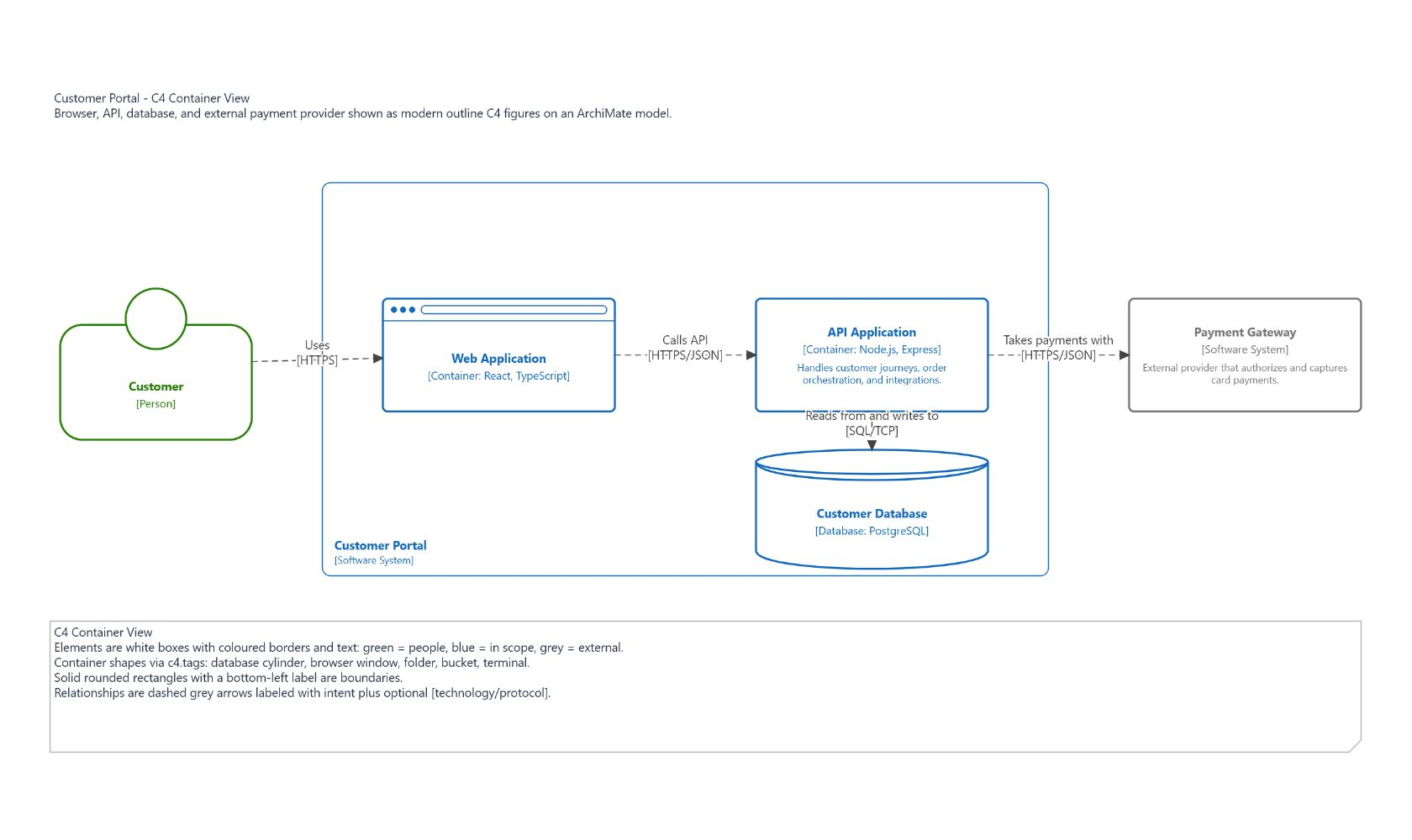
C4 views use a Structurizr-style visual mode. The underlying model remains ArchiMate, but C4-tagged nodes in views with c4.viewType render with C4 figures instead of ArchiMate corner icons:
- All modern C4 figures use white fills with colored outlines and text.
- People use a green head-on-box figure.
- In-scope software systems, containers, and components use blue outlines and text.
- Components use the C4 component notation: a rounded box with two small tabs projecting from the left edge.
- External elements use grey outlines and text; they are detected from
c4.external=trueor anexternaltag inc4.tags. - Containers can render as a database cylinder, browser window, folder, bucket, or terminal when
c4.tagscontains the matching shape tag. - Terminal containers show a prominent
>_prompt in the top-left corner. - Parent software systems, containers, and deployment nodes render as solid rounded boundaries with their label at the bottom-left on two lines:
Namefollowed by[Software System],[Container], or[Deployment Node]. - Relationships render as dashed grey directed arrows with intent labels and optional
[technology/protocol]lines.
New C4 templates and palette-created C4 elements persist the default fill, line, and font colors so exported .archimate files look close to C4 in other tools. Imported or older C4 views without those styles still render correctly in Archi Online through computed C4 defaults. Any explicit user styling on a node or connection takes precedence.
Mapping
| C4 concept | ArchiMate concept | C4 metadata |
|---|---|---|
| Person | BusinessActor | c4.kind=person |
| Software System | ApplicationComponent | c4.kind=software-system |
| Container | ApplicationComponent | c4.kind=container |
| Database | ApplicationComponent | c4.kind=container, c4.tags=database, c4.technology=... |
| Web Browser | ApplicationComponent | c4.kind=container, c4.tags=browser, c4.technology=... |
| Folder | ApplicationComponent | c4.kind=container, c4.tags=folder, c4.technology=... |
| Bucket | ApplicationComponent | c4.kind=container, c4.tags=bucket, c4.technology=... |
| Terminal | ApplicationComponent | c4.kind=container, c4.tags=terminal, c4.technology=... |
| Component | ApplicationFunction | c4.kind=component |
| Deployment node | Node | c4.kind=deployment-node |
| Infrastructure node | Node | c4.kind=infrastructure-node |
| Container instance | Artifact | c4.kind=container-instance, c4.instanceOf=... |
For component views, components are modeled as ApplicationFunctions. The owning container is modeled as an ApplicationComponent; an AssignmentRelationship can connect the container to the functions, while the view uses boundary/nesting to keep the C4 presentation readable.
Relationships
C4 relationships default to TriggeringRelationship from caller to callee. Use another ArchiMate relationship only when its meaning is intentional:
FlowRelationshipwhen something is actually transferred.ServingRelationshipwhen one element provides behavior to another.AccessRelationshipwhen data read/write semantics matter.
Relationship labels should describe intent. Add c4.technology for protocol or mechanism, for example HTTPS/JSON, SQL/TCP, or AMQP. Dynamic views can add c4.order so labels render as ordered steps.
Properties
Archi Online uses these stable profile keys:
| Key | Purpose |
|---|---|
c4.kind | C4 element kind. |
c4.viewType | C4 view type on an ArchiMate view. |
c4.scopeId | Optional id or name of the scoped element. |
c4.technology | Technology, protocol, or runtime label. |
c4.tags | Comma-separated tags. database, browser, folder, bucket, and terminal select a Container shape; external selects external styling. Custom tags are preserved. |
c4.external | true for externally owned systems or services. |
c4.instanceOf | Source element for deployment instances. |
c4.order | Sequence number for dynamic relationships. |
The Properties panel exposes these fields on C4 elements, relationships, and views. The raw values remain visible in the normal Properties tab. Shape tags change the figure only: the displayed kind stays Container for browser, folder, bucket, and terminal shapes. Only database changes the displayed kind label to Database.
Labels
C4 element labels render as:
Name
[C4 Type: Technology]
Short documentation description
C4 relationship labels render as:
1. Intent
[Protocol/Technology]
The documentation field should contain the short C4 description. Keep deeper architecture rationale in normal ArchiMate documentation, related elements, or dedicated views.
Example
The repository includes a small C4 container-view example at public/examples/c4-customer-portal.archimate. Opened in the app's full-screen presentation mode, it looks like this: