
Scripting API
Archi Online exposes a jArchi-style JavaScript API in the Scripting panel. Scripts run in the browser against the currently open model, and one script run is batched into one undo step — a misbehaving script is a single Ctrl+Z away from being undone.
The API follows common jArchi patterns:
- a global
$()selector returning collections, - a global
modelwrapper withcreateElement,createRelationship, andcreateArchimateView, - wrapper objects for concepts, views, visual objects, connections, and folders,
- key-value properties through
prop()/removeProp(), - relationship traversal helpers (
rels,inRels,outRels,sourceEnds, …).
The Scripting panel
- The script library lives in the panel's list: create, rename, and delete scripts, and import/export them as
.ajsfiles (the jArchi script extension). - Two built-in examples ship with the app: a small starter script and a jArchi capability test.
- The Monaco editor provides IntelliSense for the whole API — the same type declarations documented on this page.
- Run with the Run button or
Ctrl+Enter. Output appears in the panel's console.
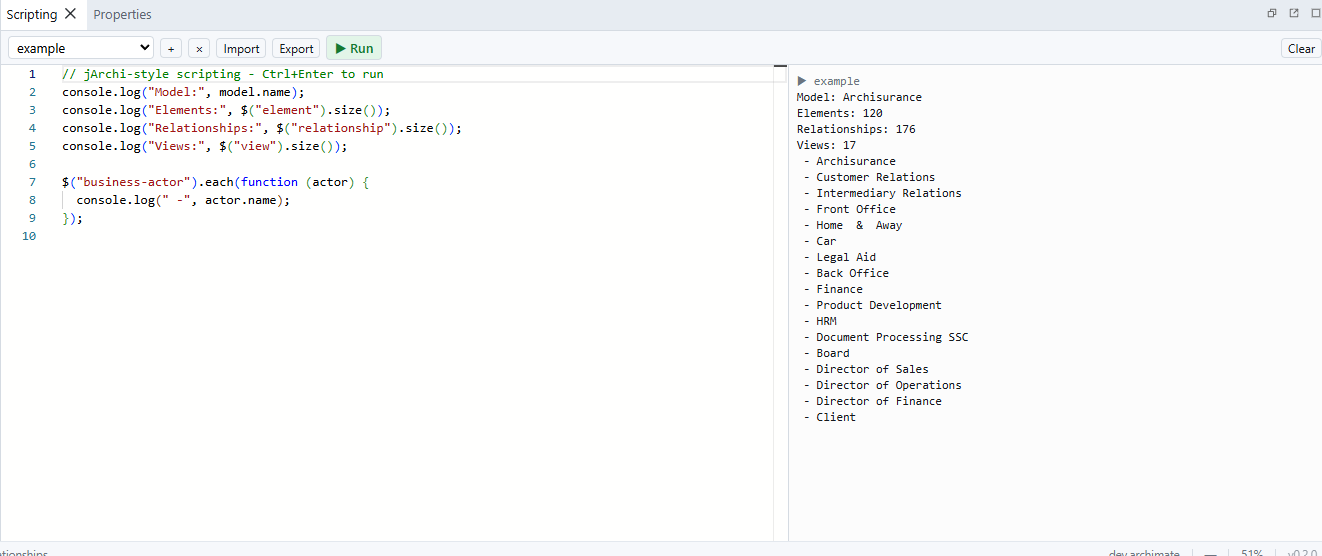
Script environment
Scripts receive these globals:
| Global | Description |
|---|---|
$ | Selector function; also exposes $.model. |
model | The open model (a JModel wrapper). |
console | log, info, warn, error write to the panel console; clear() empties it. |
window | alert, confirm, and prompt only. |
exit() | Stop the script immediately (not an error). |
Scripts are not sandboxed — they run as trusted local code in the page. The globals above are the supported API surface; anything else you reach is an implementation detail that may change.
Type names
Wherever a type is expected, ArchiMate type names are accepted in jArchi kebab-case (business-actor, application-component, serving-relationship), in CamelCase (BusinessActor), and — for relationships — without the -relationship suffix (composition means composition-relationship).
Selectors
$() accepts a selector string (or an existing wrapper/collection) and returns a JCollection:
| Selector | Matches |
|---|---|
"*" | Everything: folders, elements, relationships, views. |
"concept" | Elements and relationships. |
"element", "relationship", "view", "folder" | That kind of object. |
"business-actor" | A specific type. |
".Customer" | Objects whose name is exactly Customer. |
"#abc123" | The object with that id. |
"business-actor.Customer" | Type and exact name combined. |
Name matching is exact, not substring — use filter() with a function for fuzzy matching.
Collections
JCollection methods:
var actors = $("business-actor");

// Inspection
actors.size();      // count (also actors.length)
actors.isEmpty();
actors.first();     // wrapper or undefined
actors.last();
actors.get(0);
actors.toArray();

// Iteration and transformation
actors.each(function (obj, index) { console.log(index, obj.name); });
actors.map(function (obj) { return obj.name; });   // plain array

// Filtering
actors.filter(".Customer");                        // selector…
actors.filter(function (o) { return o.name.indexOf("Cust") >= 0; }); // …or predicate
actors.not(".Draft");
actors.is("business-actor");                       // boolean
actors.add($("business-role"));                    // union with another collection

// Bulk operations
actors.prop("status", "reviewed");                 // set on every member
actors.removeProp("legacy");
actors.attr("fillColor", "#ffe0e0");               // get/set any wrapper field
actors.delete();
Traversal helpers (each accepts an optional selector to filter the result):
$("folder").children();          // direct children
$("folder").find();              // all descendants
$("business-actor").parent();
$("business-actor").parents();

$(".Application").rels();        // all relationships touching the element
$(".Application").inRels();     // incoming only
$(".Application").outRels();    // outgoing only
$("serving-relationship").ends();        // both endpoints
$("serving-relationship").sourceEnds();  // source concepts
$("serving-relationship").targetEnds();  // target concepts

$(".Customer").objectRefs();     // visual objects referencing the concept
$(".Customer").viewRefs();       // views containing the concept
The model
model.name;
model.purpose;

model.prop();                    // property keys
model.prop("key");               // get
model.prop("key", "value");      // set (add duplicate key with third arg: true)
model.removeProp("key");         // remove (or a specific value: removeProp(key, value))

model.search(options);
model.previewReplace(options);
model.applyReplace(preview, selectedRowIds);
model.propertyUsage();
model.previewRenamePropertyKey("old", "new", false);
model.renamePropertyKey(preview);
model.previewDeletePropertyKey("obsolete");
model.deletePropertyKey(preview);

model.createElement(type, name, folder);
model.createRelationship(type, name, source, target, folder);
model.createArchimateView(name, folder);

model.specializations;           // ordered JProfile[]
model.createSpecialization("Retail Customer", "business-actor");
model.findSpecialization("Retail Customer", "business-actor");
folder arguments are optional; new objects land in the default folder for their kind. createRelationship enforces the ArchiMate allowed-relationship matrix and throws if the combination is invalid:
var actor = model.createElement("business-actor", "Customer");
var service = model.createElement("business-service", "Claims Service");
var rel = model.createRelationship("serving-relationship", "", service, actor);

var view = model.createArchimateView("Service Overview");
var serviceNode = view.add(service, 40, 120, 160, 60);
var actorNode = view.add(actor, 40, 20, 160, 60);
view.add(rel, serviceNode, actorNode);
view.openInUI();
Search and replace
JModel exposes non-mutating search, mandatory replacement preview, and single-transaction apply methods:
var hits = model.search({
  find: "Customer",
  scope: "model"
});

var preview = model.previewReplace({
  find: "Customer (.+)",
  replace: "Client $1",
  scope: "active-view",
  name: true,
  documentation: true,
  propertyValues: false,
  matchCase: false,
  regex: true
});

if (!preview.valid) {
  throw new Error(preview.error);
}

// Apply only Name rows. Omit the second argument to apply every preview row.
var selectedIds = preview.rows
  .filter(function (row) { return row.field === "Name"; })
  .map(function (row) { return row.id; });
var changedFields = model.applyReplace(preview, selectedIds);
Options default to scope: "model", Name and Documentation enabled, and property values, case matching, and regular expressions disabled. Model scope means only the active model session, never all open models. Active-view scope uses the same boundaries as the toolbar dialog: the view, recursive annotations and plain connections, referenced concepts, and referenced view objects without descending into their contents.
Both modes find every occurrence in a field and use Unicode matching. Literal mode treats the find and replacement strings literally. With regex: true, the find text is a global Unicode JavaScript regular expression and replacement text supports native tokens such as $1 and $&. Empty find text is invalid; an empty replacement is valid.
Each result row has id, ownerId, ownerKind, ownerType, location, field, before, after, and count. search() returns matching rows without changing the model (after equals before) and throws for invalid criteria, including an empty find, invalid regular expression, or missing active view. A valid search with no matches returns an empty array. previewReplace() returns { valid, error, rows } with the proposed after-values. Pass that exact preview object to applyReplace(); it returns the number of fields changed.
A preview captures its model session and active view. Any intervening model or active-view change makes it stale, and a closed or replaced session cannot be retargeted. applyReplace() rejects invalid, stale, or read-only previews and routes an accepted preview through one Find and Replace operation. During a normal script run, that operation remains part of the run's single Script undo step.
Global property keys
The model-wide property ledger is exposed through the same mandatory-preview contract as the UI:
var usage = model.propertyUsage("status");
usage.forEach(function (entry) {
  console.log(entry.displayKey, entry.occurrenceCount, entry.ownerCount);
});

var rename = model.previewRenamePropertyKey("status", "lifecycle", false);
if (rename.collision) {
  rename = model.previewRenamePropertyKey("status", "lifecycle", true);
}
if (!rename.valid) throw new Error(rename.error);
model.renamePropertyKey(rename);

var removal = model.previewDeletePropertyKey("obsolete");
if (removal.valid) model.deletePropertyKey(removal);
Usage records preserve model order and include exact key/value, owner kind and type, property index, and stable location. Rename and delete previews capture the active model session and become stale after model/session changes. A rename collision requires explicit acknowledgement and never merges duplicate rows.
Common object members
Every wrapper (JConcept, JView, JVisual, JConnection, JFolder) has:
obj.id;             // read-only
obj.type;           // read-only, e.g. "business-actor"
obj.name;
obj.documentation;
obj.prop();
obj.prop("key");
obj.prop("key", "value");
obj.removeProp("key");
obj.delete();
Not every wrapper supports every setter — for example, connections derive their name from the underlying relationship and refuse renames.
Concepts
JConcept wraps elements and relationships. Relationship-only members:
concept.specialization;          // primary specialization name or undefined
concept.specialization = "Retail Customer";

var replacement = concept.setType("business-role"); // new ID and wrapper
setType() replaces the concept and returns a wrapper for the replacement. Names, documentation, properties, occurrences, and semantic references are preserved; incompatible specialization and type-specific fields are cleared. Keep the returned wrapper because the original wrapper points to the removed concept.
Profiles expose name, type, image, and delete(). Profile names are unique case-insensitively within a base concept type; deleting a used profile removes its assignments in the same undo transaction.
Relationship-only members:
relationship.source;              // JConcept
relationship.target;              // JConcept
relationship.accessType;          // "access" | "read" | "write" | "readwrite"
relationship.influenceStrength;   // e.g. "++"
relationship.associationDirected; // boolean
relationship.invert();             // stable relationship ID; throws if illegal
invert() is supported for relationships only. It swaps the semantic ends and all visual occurrences, including bendpoint direction and source/target label positions.
Views
JView wraps an ArchiMate diagram:
view.name;
view.documentation;
view.viewpoint;
view.routerType;                    // "manual" or "manhattan"; writable
view.openInUI();                  // open/focus the view tab

view.add(element, x, y, width, height);        // returns JVisual
view.add(relationship, sourceVisual, targetVisual); // returns JConnection
view.createObject("note", x, y, width, height);
view.createObject("group", x, y, width, height);
view.createLegend(x, y, options); // native live legend, returns JVisual
view.createPlainConnection(source, target, connectionType); // returns JConnection

view.nodes();                     // top-level visual objects
view.nodes({ recursive: true }); // including nested children
view.connections();
view.bounds();                    // union of node bounds, or null when empty
view.bounds({ recursive: false });
createPlainConnection() adds a native, non-semantic diagram connection. A Note must be one endpoint; the other can be any connectable object or connection in the same view. connectionType is optional and uses Archi's native bitmask (1 target filled, 2 dashed, 4 dotted, 8 source filled, 16 target hollow, 32 source hollow, 64 target open, 128 source open):
var note = view.createObject("note", 40, 40, 180, 80);
var actor = model.createElement("business-actor", "Customer");
var actorVisual = view.add(actor, 300, 40, 140, 60);
var annotation = view.createPlainConnection(note, actorVisual, 64);
annotation.name = "Context";
createLegend() uses Desktop defaults for omitted options. A legend visual has type diagram-model-legend, exposes a writable legendOptions object, and can resize itself to its live contents:
var legend = view.createLegend(40, 40, {
  rowsPerColumn: 10,
  colorScheme: 1, // 0 None, 1 Core, 2 User
  sortMethod: 1   // 0 Name, 1 Category
});
legend.legendOptions = Object.assign({}, legend.legendOptions, {
  displayRelations: false,
  widthOffset: 8
});
legend.setLegendOptimalSize();
Visual objects
JVisual wraps a diagram node — an element visual, note, group, or view reference:
visual.concept;          // underlying JConcept (undefined for notes/groups)
visual.view;             // owning JView
visual.bounds;           // parent-relative {x, y, width, height}
visual.text;             // note text
visual.legendOptions;    // native LegendOptions, or undefined
visual.setLegendOptimalSize(); // legends only
visual.fillColor;        // "#rrggbb" or undefined for the type default
visual.lineColor;
visual.fontColor;
visual.opacity;          // 0–255
visual.labelExpression;
visual.gradient;         // -1 none/default, 0 top, 1 left, 2 right, 3 bottom
visual.lineStyle;        // -1 default, 0 solid, 1 dashed, 2 dotted, 3 hidden
visual.lineWidth;        // 1 normal, 2 medium, 3 heavy
visual.imageSource;      // 0 specialization, 1 custom
visual.imagePosition;    // 0 through 9, matching Desktop Archi
visual.fontSize;         // points
visual.fontName;
visual.fontStyle;        // "normal", "bold", "italic", or "bolditalic"
visual.textAlignment;    // 1 left, 2 center, 4 right
visual.textPosition;     // 0 top, 1 center, 2 bottom
visual.figureType;       // 0 default, 1 alternate (element visuals only)
visual.borderType;       // group: 0 tabbed, 1 rectangle; note: 0 dog-ear, 1 rectangle, 2 none
visual.iconVisible;      // 0 visible unless replaced by an image, 1 always, 2 hidden

visual.add(element, x, y, width, height);  // nest a child (relative coordinates)
visual.parent();          // JVisual or JView
visual.children();
visual.absoluteBounds();  // view-space coordinates
visual.connections();
visual.connections({ incoming: false });  // outgoing only
visual.connections({ outgoing: false });  // incoming only
visual.bounds is relative to the parent container; absoluteBounds() returns view coordinates, which is usually what layout code wants.
Connections
JConnection wraps a diagram connection:
connection.view;
connection.source;        // JVisual or JConnection
connection.target;        // JVisual or JConnection
connection.concept;       // underlying relationship
connection.lineColor;
connection.fontColor;
connection.font;          // raw Archi font string
connection.textPosition;  // 0 source, 1 middle, 2 target
connection.connectionType; // native plain-connection bitmask
connection.nameVisible;   // plain-connection label visibility
connection.labelExpression;
connection.lineStyle;
connection.lineWidth;
connection.bendpoints;    // raw Archi/GEF format
connection.absoluteRoute();
connection.setAbsoluteRoute(points);
connection.routedPoints(); // rendered route; Manhattan derives orthogonal points
connection.reconnect("target", anotherConnection); // node or connection endpoint
bendpoints uses Archi's relative offset representation ({ startX, startY, endX, endY }). For layout code, prefer the absolute helpers:
connection.setAbsoluteRoute([
  { x: 180, y: 130 },
  { x: 220, y: 160 }
]);
console.log(connection.absoluteRoute());
absoluteRoute() returns only the intermediate points — the source and target anchors are not included.
source and target are JConnectable values: either a JVisual or another JConnection. reconnect() validates same-view ownership, semantic endpoint rules, and recursive-cycle safety, then applies one Reconnect Connection operation. routedPoints() returns the actual rendered intermediate points; for a Manhattan view it derives the orthogonal route without overwriting the connection's stored dormant bendpoints.
connectionType and nameVisible are writable only for plain connections. The remaining appearance fields above apply to semantic and plain connections.
Bulk layout
view.layout() applies many node and route changes in a single operation:
var view = $("view").first();
var nodes = view.nodes({ recursive: true });

var updates = {};
nodes.forEach(function (node, index) {
  updates[node.id] = { x: 80 + index * 180, y: 120, width: 140, height: 60 };
});

view.layout({ nodes: updates });
Connection routes can be updated in the same call. A connection update takes either route (absolute intermediate points; [] clears manual routing) or raw bendpoints, not both:
var conn = view.connections()[0];
view.layout({
  connections: {
    [conn.id]: { route: [{ x: 260, y: 150 }] }
  }
});
Rules:
- node and connection ids must belong to the target view,
- coordinates and dimensions must be finite numbers,
- omitted
width/heightkeep their current values, - minimum node dimensions follow the app settings,
- layout coordinates are absolute view coordinates; stored nested bounds remain parent-relative.
For automatic layout, the official ELK Layout extension wraps the app-hosted ELK engine — see Extension API (app.layout.elk) and Extensions.
Packed capability maps
Capability maps show a hierarchy as packed nested rectangles — children tiled inside their parents, no relationship lines. These are additive Archi Online APIs. The official Capability Map extension exposes the same operations as menu commands and a settings panel — see Extensions.
Generating a map
model.createPackedView() derives the hierarchy from whole → part relationships (Composition, then Aggregation, by default), packs it, styles it by depth, and opens the new view:
var root = $(".Enterprise").first();  // a root Capability
var view = model.createPackedView({
  roots: root,          // element, array of elements, or array of ids
  name: "Capability Map",
  depth: 2,             // optional level cut-off
  layout: {
    mode: "grid",
    gridAlgorithm: "frontier",
    leafSizing: "text-aware",
    sort: "name",
    targetAspect: 1.6
  }
});
Options:
roots(required) — root element(s). Any element type works; children default to the roots' own types (elementTypeswidens the filter).relationshipTypes— hierarchy sources in priority order; defaults to["composition-relationship", "aggregation-relationship"].depth— levels below the roots (unlimited when omitted).direction—"source-is-parent"(default) or"target-is-parent"for models drawn part → whole.weightProperty— element property parsed as a number for treemap weights.mode—"grid"(uniform cells, default) or"treemap"(area ∝ weight).layout— packing options:leafWidth/leafHeight(default 120×55),padding/gutter(12),titleBandHeight(derived from the level-0 font),targetAspect(1.6),sort("name"|"weight"|"none"),columns(fixed items per row),algorithm("auto"|"squarify"|"strip", treemap only), andminCellWidth/minCellHeight(treemap floors). Grid calls may additionally setgridAlgorithm("balanced-rows"or"frontier"),leafSizing("fixed"or"text-aware"),frontier,stability, androotPlacement("preserve"or"repack"). Supplyingcolumnskeeps the deterministic legacy fixed-column meaning.style— per-depth styling:levelFills(explicit fills) orbaseFill(level 0; deeper levels fade toward white),fontSizes(points per depth), text alignment/position for parents and leaves,iconVisible, andapplyStyling: falsefor geometry only.open: false— create without opening the view.
Multi-parent conflicts pick one parent (Composition beats Aggregation, then alphabetical) and cycles are broken safely; duplicates are reported in the result of the underlying operation.
Frontier grid layout
gridAlgorithm: "frontier" selects the deterministic GCHRP-2 grid engine. Unlike balanced rows, which commits to one rectangle at each subtree, the frontier engine keeps a bounded set of portrait, square and landscape forms until their parent and the complete root forest are known. It composes order-preserving shelves, columns and guillotine partitions with independently chosen child forms, then prunes geometry regions and quality variants in two separate bounded stages. Final targetAspect and targetExtent pressure is applied to the complete forest rather than repeatedly forcing every subtree toward the same shape. The quality tiers put label legality, stability, visual rhythm, frame fit, and compactness in that order, with descendant effects weighted by subtree significance. The search never uses randomness or elapsed time as a cutoff. It is still a rectangular canonical capability map, not a weight-proportional treemap.
leafSizing: "text-aware" makes label fit a geometry constraint. The engine chooses among a small vocabulary of roughly equal-area leaf shapes and expands deterministically when none fits. It uses a conservative glyph-class estimate that mirrors the canvas's whitespace and break-word rules with a safety margin. Exact browser font metrics can vary, so unusually styled fonts or scripts outside the estimator's Segoe UI-oriented classes should be visually checked; labels are never deliberately shrunk below the supplied font size.
The bounded-search defaults are approximately 16 candidates per node, a beam width of 20, aspect buckets from portrait through wide landscape, and reduced deterministic grammars for very large sibling groups. Higher values can improve choice diversity but cost more CPU and allocation.
The aesthetic terms are independently configurable through aesthetics: aspect, raggedness, whitespace, orphan, alignment, movement, neighborhood, and overflow. frontier accepts maxCandidatesPerNode, beamWidth, epsilon, aspectBuckets, and largeSiblingThreshold. stability.switchThreshold controls hysteresis (0.07 by default), while stability.targetExtent adds a viewport-overflow preference.
Repacking
view.layoutPacked() repacks the view's existing element-node nesting. The current sibling order is preserved (sort: "none"), so manual arrangement survives. Frontier relayout defaults to rootPlacement: "preserve": top-level anchors, neighbours, bands, and broad regions remain stable when feasible, and a bounded deterministic repair minimises displacement and frame expansion when resizing introduces overlap. Pass rootPlacement: "repack" for a new complete-forest arrangement. Selected roots are repaired only against siblings in the same parent-relative coordinate space:
view.layoutPacked();                          // whole view
view.layoutPacked({ scope: $("selection").toArray() }); // chosen containers
view.layoutPacked({ mode: "treemap", weightProperty: "headcount" });
view.layoutPacked({
  gridAlgorithm: "frontier",
  leafSizing: "text-aware",
  rootPlacement: "repack"
});
Returns { nodeCount, size }.
Syncing with the model
view.syncPacked() reconciles an existing map after the model changes: new children are added at their name-sorted position, deleted or detached elements are removed, moved elements are reparented, and the map is repacked. Surviving nodes keep their styling and relative order. Frontier sync automatically derives parent-relative previous geometry from the view and uses movement, previous neighbours, band/region continuity, and tiered hysteresis to avoid replacing a compatible form for a marginal visual gain; scripts do not construct that context. A supplied layout.sort affects new view generation, but does not reorder established survivors during sync:
var result = view.syncPacked();
console.log(result.added, result.removed, result.reparented);
Roots default to the view's top-level element nodes; pass roots to override. All createPackedView hierarchy options apply.
Heat maps
view.applyHeatmap() colors element nodes from an element property and adds a legend built from value buckets (one colored note per bucket, grouped under a titled group; re-running replaces it):
view.applyHeatmap({ property: "maturity" });          // numeric: red → green
view.applyHeatmap({
  property: "status",                                  // strings: categorical
  missingColor: "#dddddd",                             // paint missing values
  legend: { x: 40, y: 40, title: "Maturity" }          // or legend: false
});
Numeric mode interpolates the palette across the value range (min/max override auto-detection); enum mode assigns one color per distinct value. mode: "auto" (default) picks numeric only when every present value parses as a number. Returns { painted, missing, buckets }.
Example: build, weight, and color
var root = model.createElement("capability", "Enterprise");
["Claims", "Billing", "Servicing"].forEach(function (name) {
  var child = model.createElement("capability", name);
  model.createRelationship("composition-relationship", "", root, child);
  child.prop("maturity", String(1 + Math.floor(Math.random() * 5)));
});

var view = model.createPackedView({ roots: root, name: "Capability Map" });
view.applyHeatmap({ property: "maturity" });
Example: model audit
var unnamed = $("element").filter(function (item) {
  return !item.name || !item.name.trim();
});

console.log("Elements:", $("element").size());
console.log("Relationships:", $("relationship").size());
console.log("Views:", $("view").size());
console.log("Unnamed elements:", unnamed.size());
Example: nested group
var capability = model.createElement("capability", "Online Service");
var app = model.createElement("application-component", "Claims Portal");
var view = model.createArchimateView("Nested Example");

var group = view.createObject("group", 40, 40, 360, 180);
group.name = "Digital Channel";

var capVisual = group.add(capability, 20, 30, 140, 55);
var appVisual = group.add(app, 190, 30, 140, 55);

console.log(capVisual.bounds.x);           // relative to the group
console.log(capVisual.absoluteBounds().x); // view coordinates
view.openInUI();
Example: recolor by property
$("element").each(function (el) {
  if (el.prop("status") === "deprecated") {
    $(el).objectRefs().attr("fillColor", "#f4cccc");
  }
});
jArchi compatibility notes
The core jArchi idioms — selectors, collections, model.create*, view add/createObject, properties, traversal — work as in desktop jArchi, so many published jArchi scripts run unchanged. APIs tied to the desktop platform (file system access, Java interop, UI toolkits, load() of external scripts) do not exist here. When in doubt, the Monaco IntelliSense shows exactly what is available.
view.createPlainConnection() and writable plain-connection appearance fields are additive Archi Online APIs. They persist Archi's native diagram connection attributes but are not currently part of desktop jArchi's public API. The packed capability-map APIs (model.createPackedView, view.layoutPacked, view.syncPacked, view.applyHeatmap) and the iconVisible visual field are also Archi Online additions; the visual font and text fields (fontSize, fontName, fontStyle, textAlignment, textPosition, figureType, borderType) follow desktop jArchi's names and semantics.
Related pages:
- Extension API — the
appAPI for extending the UI. - User Guide — the Scripting panel in context.